
Building a Cross-Platform Map-Based Delivery Planning System
A system used by office staff, clients, and field operators to coordinate seasonal delivery of products using a shared coordinate system.
Tech used: PHP, MySQL, Angular, Node, Java, Android
Year: 2000
Context
At the start of each winter season, Monster Plowing coordinates a massive single-day effort to deliver salt buckets and bins to hundreds of clients across the GTA. Key challenges:
- For many employees, this is their first day in the field.
- Seasoned employees will still be unfamiliar with the properties they visit.
- Placement of deliveries on site is specific and coordinated.
- Mis-placed bins require costly second visits (each bin weighs 400+ lbs).
- Locked gates or other blockers can prevent delivery.
- All bins need to be picked up at the end of the season in another single-day effort.
- All bin deliveries are part of rental agreements; unrecovered bins are a financial loss.
Problem
As the company continued to grow each season, managing the specific placement of 400lbs bins of salt at an increasing number of client properties become cumbersome and time consuming.
- Writing placement instructions in text fields alone was inefficient and not effective at communcating placement.
- There was no communication layer where customers could confirm intended placement.
- When the bins needed to be picked up at the end of the season, the pickup location was not guaranteed to be accurate.
- Delivery outcomes were difficult to track.
- Requiring direct client intervention at the time of delivery was impossible under the single-day time constraint.
- Client’s specific location requests from previous season were forgotten/lossed.
- Placement-focused ordering is a unique business requirement not represented in available software.
Constraints
The solution needed to support three different user types:
- Office staff planning deliveries
- Clients reviewing delivery placement
- Field operators completing deliveries
Additional requirements:
- Support both web interfaces and an Android mobile app
- Client changes to placement or notes must be reviewed by office staff (clients cannot alter original data)
- Placement history must be preserved across multiple seasons for recurring contracts
- Some clients own their own bins; the system must track these separately, make them available for refill orders, but exclude them from pickup events
Solution
I designed a cross-platform delivery planning system centered on map-based placement of products.
Key features:
- Office staff can place delivery markers directly on a site map for each bin
- Coordinates and notes are stored with the delivery order and shared across all systems
- Clients receive notifications with a link to their portal to:
- Adjust placement or add notes
- Waive (cancel) delivery
- Order additional bins
- Add a bin to their property map that they own.
- Operators can view each item’s placement and mark it as delivered or not
- Mid-season adjustments:
- Clients can request additional bins, re-locations, or refills
- Office users can review and approve requests
- Multi-season contracts:
- When creating deliveries for returning clients, office users can view last year’s bin locations and notes
System Architecture
Delivery Workflow
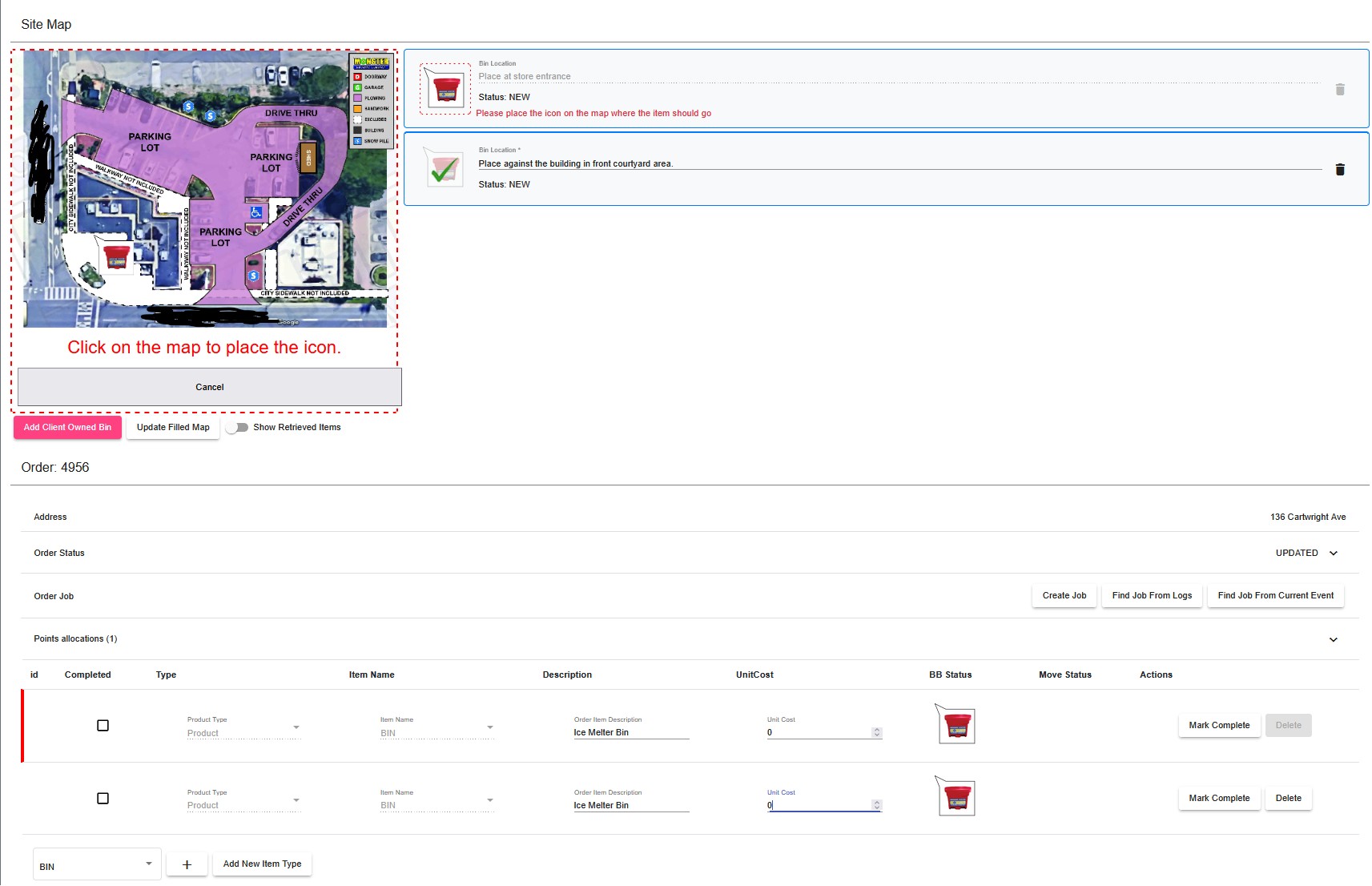
Order Creation:
Office Order Tool
- When a snow removal contract is signed, the quoted scope of work site map is integrated into the sytem.
- During signing finalization, office staff build the initial ice melter bin/bucket order included with the contract agreement.
- The order tool allows them to place each bin/bucket on a specific location on the existing site map.
- Placing the icons on the map assigns simple coordinates (in percentages of image width/height).
- Once the order is created, coordinates are saved and the order items are marked as pending.
- The office user can view previous seasons locations and notes of all delivered items if, for example, the contract is a renewal from a previous season.
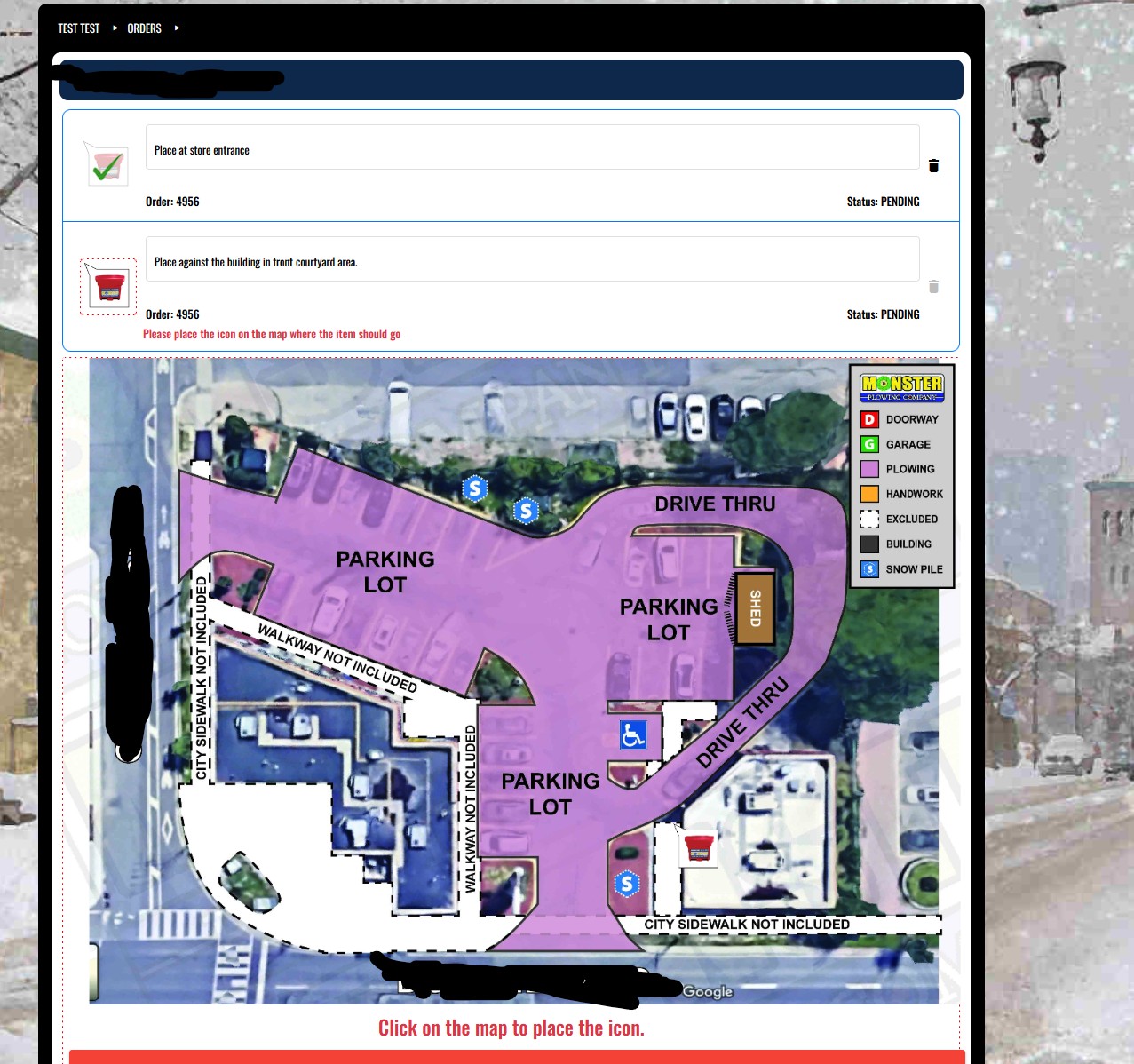
Order Review:
Client Portal Order Tool On the client portal order page, clients can:
- change the placement location of the pending order item
- change notes regarding each item
- order additional items
- waive (delete) delivery
- add bins they own to the site map and request refills of them.
Any changes requested are saved to a copy of the order for office review.
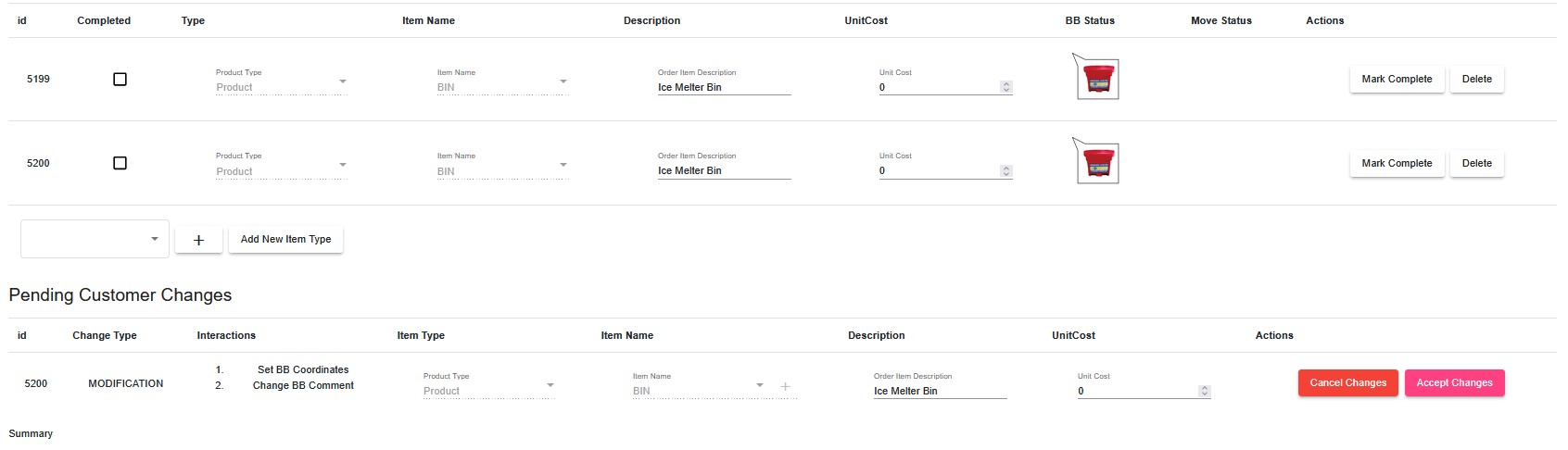
Office Review
Office Order Tool
Office can accept/cancel pending changes.
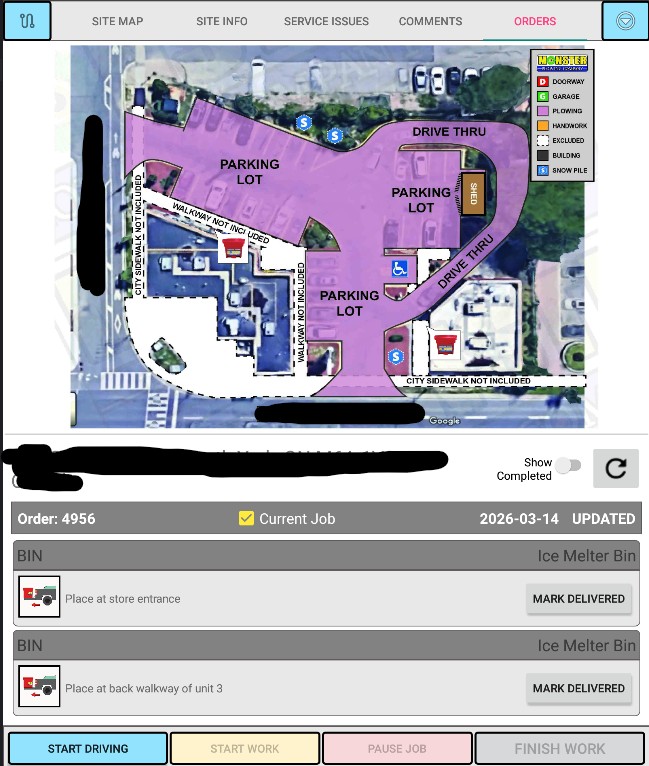
Delivery Day:
Mobile Service App
Within the operator android application, user can
- view planned bin locations on the interactive site map tool
- confirm successful delivery
- make comments on the site map about delivery blockers, or use internal chat to notify dispatch.
Once the bin is marked as delivered, it becomes a permanant item in the sites’ data. Both office staff, and clients can act on these items:
- requesting refills
- requesting they be moved
- requesting they be removed.
Impact
The system created a shared understanding of delivery instructions across all stakeholders.
Benefits included:
- clearer placement instructions for operators
- improved customer communication
- consistent delivery tracking
- dramatically reduced return visits